How mentors get paid (Stripe)
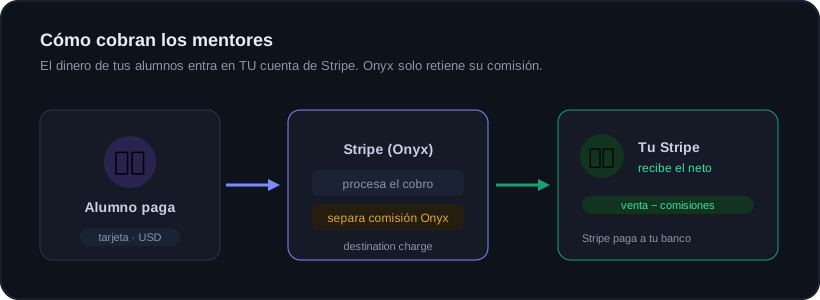
Your academy can be free or paid. When you charge, your students' money goes into YOUR own Stripe account, not Onyx's. Onyx only keeps its platform fee, automatically, in the same transaction. This guide has two parts: first the essentials for the mentor, and at the end the technical detail of the model we run.
① For the mentor: the essentials
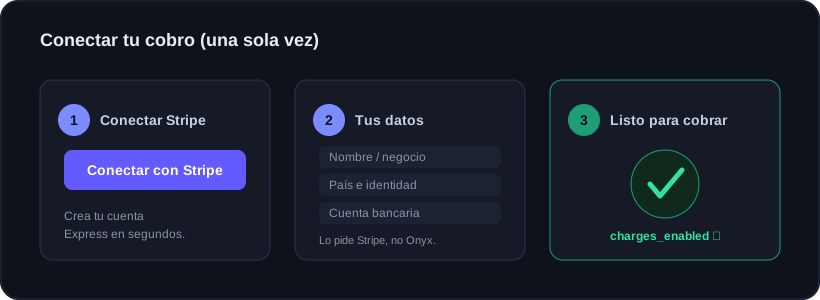
To start charging you only connect your Stripe account once. It is a Stripe process (not Onyx) and takes a couple of minutes.
What you receive and when
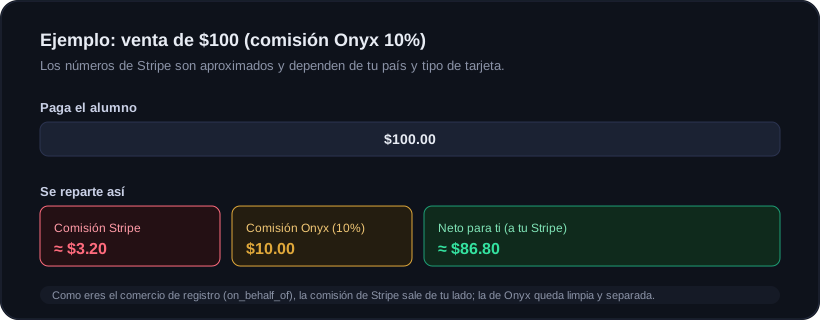
Two things are deducted from each sale: Stripe's fee (their charge for processing the payment) and Onyx's fee (the platform percentage you see in your panel). The rest is yours and stays in your Stripe balance. Stripe then pays out to your bank on its payout schedule, which you control from your own Stripe panel.
- You set the price, in US dollars (monthly, yearly and/or one-time per tier).
- You can open or close enrollments and create discount coupons anytime.
- Each monthly/yearly renewal repeats the same split automatically.
- Onyx never holds the money: it only separates its fee within the same transaction.
See your payments
From your panel you get a direct link to your Stripe (Express) dashboard, where you see every charge, your bank payouts and your invoices. Your earnings and Onyx's retained fee are also summarized in your academy panel.
Renewals, cancellations and refunds
If a student cancels, they stop renewing and lose access at the end of the paid period. If you issue a refund, that sale's commission is marked reversed in the ledger (it does not count as income). All of this is automatic.
② How it works under the hood (technical)
This part is for you and your team. It explains the model actually implemented, in case you need to audit it or give support.
Stripe Connect + destination charge
Each mentor has a Stripe Connect Express account (transfers and card_payments capabilities). Charges are created as a "destination charge" on the Onyx platform and transferred to the mentor:
- transfer_data.destination = mentor account → the net goes to their account.
- on_behalf_of = mentor account → the mentor is the merchant of record, so they absorb the Stripe fee and Onyx's fee stays clean and separate.
- One-time payments: application_fee_amount = price × %. Subscriptions (tiers, membership and mentor copy): application_fee_percent = %.
- allow_promotion_codes on → the student can apply your Stripe coupons.
Onyx's fee (hierarchy)
The percentage Onyx keeps is resolved by feeForMentor(), from most specific to most general, and is always clamped to a 0–50% range:
- 1) Manual per-mentor override (mentors.fee_pct), if the owner set one.
- 2) Their Onyx plan fee (plans.capabilities.academy_fee_pct): lower on higher plans.
- 3) Global default percentage (app_settings academy_fee).
- 4) Environment value (ONYX_ACADEMY_FEE_PCT, default 10%).
The commission ledger
A dedicated webhook (signed with ACADEMY_WEBHOOK_SECRET) listens to Stripe events and records each commission in the onyx_commissions table, idempotently by (mentor_id, stripe_ref) so retries never duplicate.
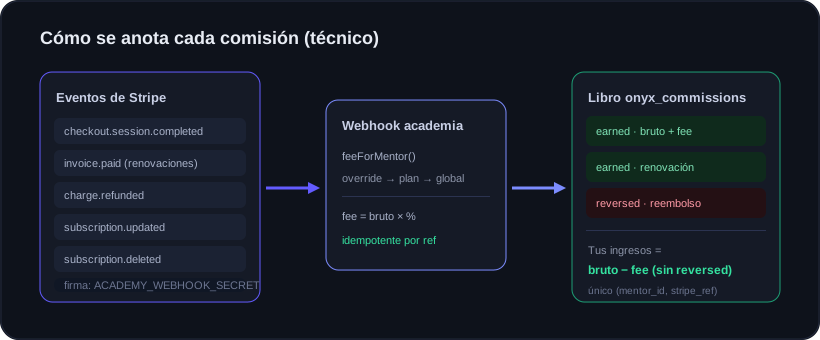
- checkout.session.completed: grants access; for one-time it records the commission tied to the payment_intent.
- invoice.paid / payment_succeeded: records the commission for each invoice, including renewals.
- charge.refunded: marks the commission as "reversed" (does not delete it; it corrects the ledger).
- subscription.updated / deleted: updates the status (active, past_due, canceled).
- account.updated: refreshes the mentor's charges_enabled.
Your panel earnings come from that ledger: gross and fee summed over the non-reversed rows, and the net is gross − fee.
Ready to trade with data, not gut feeling?
Onyx analyzes every trade, protects your risk with Guardian and shows your real numbers. Start free and upgrade whenever you want.