Connecting your account: how it works
Onyx does not move your money. There are two ways to connect depending on your platform: with a connector (MetaTrader 5/4 and cTrader) you install a small program that sends us your trades; without a connector (MatchTrader, TradeLocker and DXtrade) you connect with your broker login and we read your account via its API. In no case can we withdraw or trade without your permission.
The API key (connector platforms)
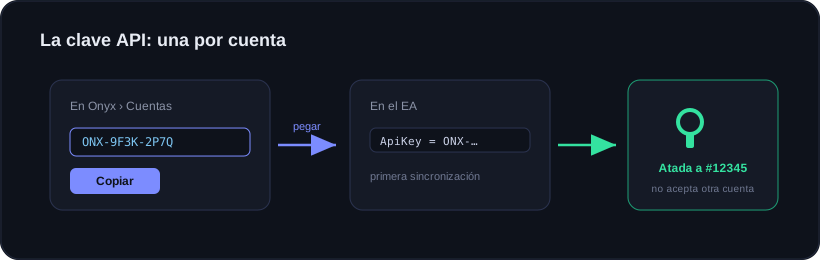
It is a password that identifies your account. You create it in Accounts, paste it into the EA, and that is it. The first time the EA syncs, that key gets bound to the account number and will not accept another.
One key per account
Every MetaTrader account needs its own. Your plan decides how many you can have active at once. If you hit the limit you can revoke a key to free a slot: that does not delete the history you already uploaded.
Ready to trade with data, not gut feeling?
Onyx analyzes every trade, protects your risk with Guardian and shows your real numbers. Start free and upgrade whenever you want.