← Back to the guide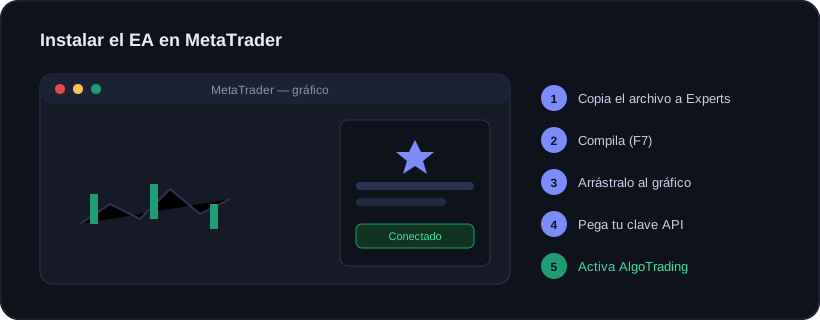

Guide · Getting started
Installing the EA in MetaTrader
🕒 3 min read
In Accounts there is a wizard that walks you through it and waits until it confirms it worked. Here is everything explained with images in case you prefer doing it yourself. It takes about 3 minutes the first time.
1
Download the file for your platform
On the install screen, hit download: .mq5 if you use MetaTrader 5, .mq4 if you use MetaTrader 4. It is a small file; check your Downloads folder.
2
Open MetaTrader’s Experts folder
In MetaTrader, top menu: File → Open Data Folder. A file explorer opens; go into the MQL5 (or MQL4) folder and then Experts. Copy the file you downloaded there.
3
Compile it in MetaEditor
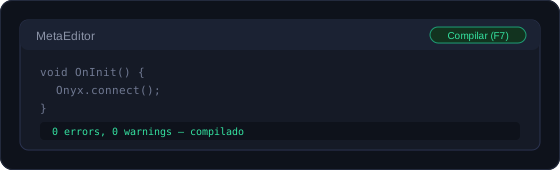
Press F4 to open MetaEditor. In the left list double-click the Onyx file and press Compile (F7). The bottom should say "0 errors": that means it is ready.
4
Drag Onyx onto a chart
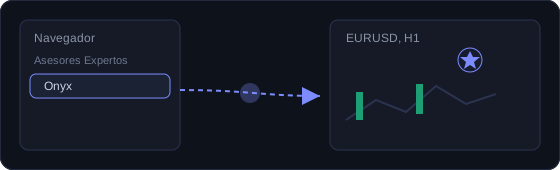
Back in MetaTrader, open the Navigator (Ctrl+N), expand Expert Advisors, and drag "Onyx" onto any open chart. The pair or timeframe does not matter.
5
Paste your API key
When you drop it, a window opens. On the inputs tab, paste your API key (the one you copied in Accounts) and leave the server URL as it comes. Click OK.
Copy and paste the whole key; an extra space at the start or end will stop it from connecting.
6
Allow the Onyx URL
Top menu: Tools → Options → Expert Advisors. Tick "Allow WebRequest" and add the Onyx URL to the list. That is what lets the EA send us your trades.
7
Turn on AlgoTrading
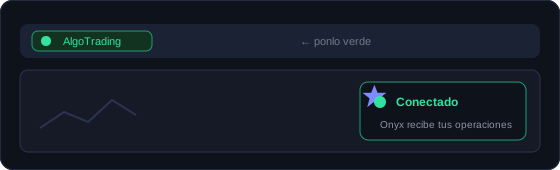
Press the "AlgoTrading" button in the top bar until it turns green. Within seconds the panel inside the chart will say "Connected".
If you see a sad face instead of a smiley in the chart corner, AlgoTrading is not active yet.
⌨️ The F4, F7 and Ctrl+N keys
F4 and F7 are function keys: they sit on the top row of your keyboard (F1, F2, F3…). Ctrl+N means hold the Ctrl key and, without releasing it, press N.
Windows vs Mac
On Windows: press F4 and F7 directly.
On Mac: it works. Download MetaTrader for Mac from your broker (it comes ready to use) and your EAs run just like on Windows. Since it is a Windows program under the hood, the function keys may need Fn + F4 or Fn + F7, and sometimes Cmd instead of Ctrl. All menus (File, Tools…) are identical, so you can always use the mouse instead of the keys.
cTrader is the exception: it has no Mac app, so there you would need a Windows VPS or a PC.
If it does not sync
It is almost always one of these four, in this order of likelihood:
- The AlgoTrading button is not green. This causes most cases.
- The URL is not authorized in Options → Expert Advisors.
- There is a cross instead of a smiley in the chart corner: the EA is not active there.
- The key was pasted with an extra space or incomplete.
An EA only works with MetaTrader open and connected. If you shut down your computer, it stops recording and stops protecting. If you trade seriously, consider a VPS to keep it running 24/7.
Ready to trade with data, not gut feeling?
Onyx analyzes every trade, protects your risk with Guardian and shows your real numbers. Start free and upgrade whenever you want.
← PreviousConnecting by API (MatchTrader, TradeLocker and DXtrade)Next →What Onyx does and does not do
Was this useful?
📱 Carry Onyx on your phone — Android & iPhone