← Volver a la guía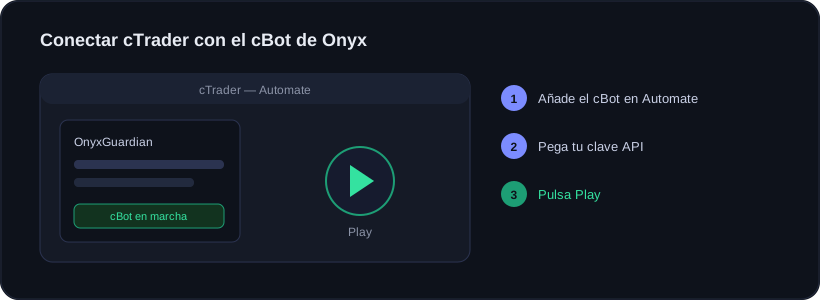
Guía · Primeros pasos
Conectar tu cuenta de cTrader
🕒 1 min de lectura
Onyx funciona igual en cTrader que en MetaTrader: lee tus operaciones en solo lectura, nunca opera ni toca tu dinero. La diferencia es que en cTrader el conector se llama cBot (en MetaTrader es EA), pero hace lo mismo.
Pasos
1
Elige la plataforma cTrader
En Onyx, en Conectar cuenta, selecciona cTrader. Verás el botón para descargar el conector y el sitio donde crear tu clave API.
2
Descarga el cBot de Onyx
Baja el conector: el archivo .algo (listo para usar) o el código .cs si prefieres compilarlo tú. Guárdalo a mano.
3
Añádelo en Automate
Abre cTrader Desktop y ve a la pestaña Automate. Importa o pega el cBot de Onyx, compílalo y arrástralo a cualquier gráfico.
4
Pega tu clave y pulsa Play
En los parámetros del cBot pega tu clave API de Onyx. Asegúrate de que el botón global de automatización de cTrader está activado, y pulsa Play.
Si Play está en gris, activa primero el interruptor global de automatización arriba a la derecha de cTrader.
Confirmación
Cuando el cBot reporte, tu cuenta aparecerá conectada y verás tus estadísticas en segundos.
El Onyx Guardian y el copy trading también existen para cTrader, como cBots separados, con los mismos ajustes que en MetaTrader.
¿Listo para operar con datos, no con corazonadas?
Onyx analiza cada operación, cuida tu riesgo con el Guardian y te muestra tus números reales. Empieza gratis y sube de plan cuando quieras.
¿Te sirvió?
📱 Lleva Onyx en el móvil — Android e iPhone