← Back to the guide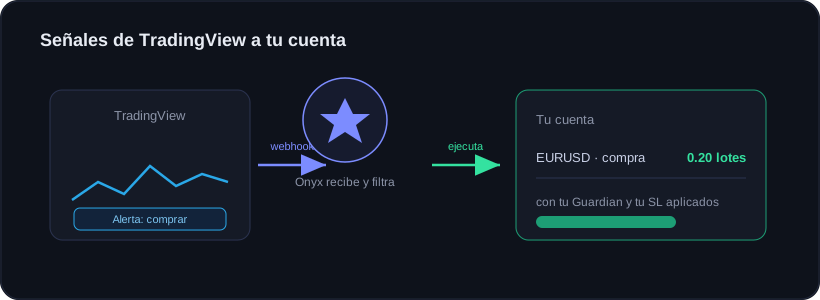
Guide · Getting started
TradingView → Onyx: execute your alerts
🕒 1 min read
Onyx can receive TradingView alerts via webhook and execute them in your real account using the Copy EA you already have installed. No need to change the EA.
What you need
- A connected account with the Copy EA (OnyxCopySlave) running.
- A plan that includes TradingView.
- A paid TradingView account (webhooks aren't in their free plan).
Steps
1
Enable TradingView in Onyx
In Onyx open TradingView and turn it on for your account. It gives you a unique webhook URL and JSON message, yours only.
2
Paste your webhook URL
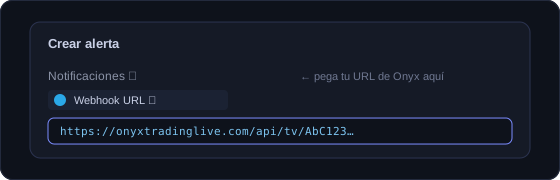
When creating an alert in TradingView, go to the Notifications tab, tick "Webhook URL" and paste the URL Onyx gave you.
3
Paste the JSON message
Copy the JSON message from Onyx and paste it into the alert’s "Message" field. That text tells Onyx what to trade and in which direction.
4
Set your limits
In Onyx set your default lot, your max lot and the allowed symbols. That way a signal never opens more than you decide.
5
Send a test signal
Fire the alert once to check the trade lands in your account with your Guardian and Stop Loss applied.
Execution respects your Guardian: if you are at your daily limit, the signal will not open.
Safety
🛡️ Onyx Guardian still watches that account: if your daily loss is hit, the EA won't open even if a signal arrives.
The webhook token isn't the EA key. If leaked, it only allows sending signals with a lot cap, and you can rotate it with one click.
Ready to trade with data, not gut feeling?
Onyx analyzes every trade, protects your risk with Guardian and shows your real numbers. Start free and upgrade whenever you want.
Was this useful?
📱 Carry Onyx on your phone — Android & iPhone